How To
Getting Started
Section titled “Getting Started”To get started with a taking part in a leaderboard, head to the Lockout Discord and look for the leaderboards channel for the game you want to play
In the channel there will be posts by the lockout bot for each leaderboard created, along with a thread to discuss the board and submit runs.
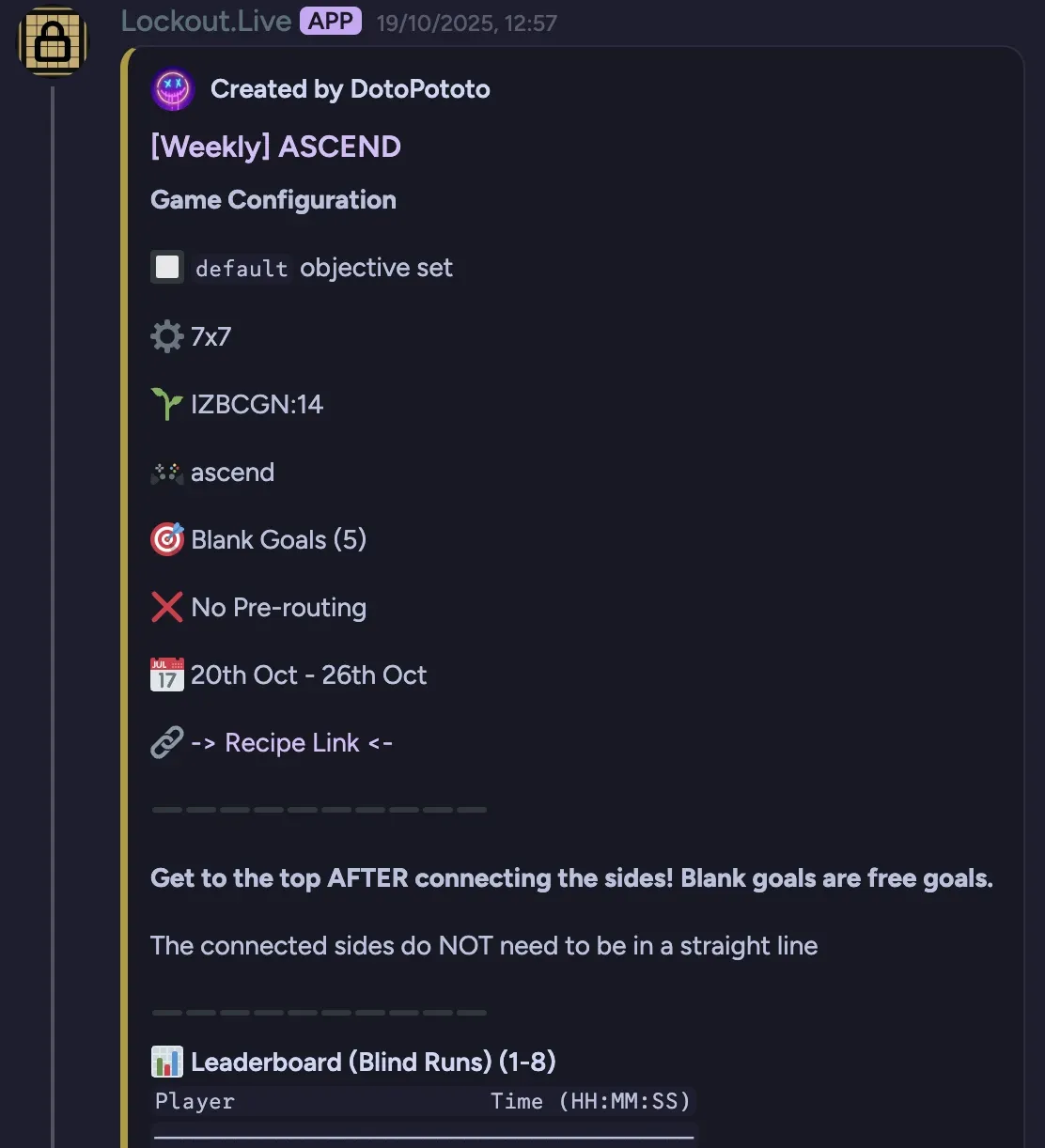
Leaderboard Info
Section titled “Leaderboard Info”The leaderboard post is split into several parts. This gives you all the info you need to re-create the board and the challenge for running it.
For more information on these, see Using the App
Game Configuration
Section titled “Game Configuration”🔲 Objective set
Section titled “🔲 Objective set”The objective set for the game
⚙️ Setting
Section titled “⚙️ Setting”The board setting, usually either the size of the board (Bingo, Ascend etc) or time (Rush)
🌱 Seed
Section titled “🌱 Seed”The board seed
🎮 Mode
Section titled “🎮 Mode”The game mode (Bingo, Ascend etc)
🎯 Modifiers
Section titled “🎯 Modifiers”The modifiers used i.e. Chaos Mode. Where applicable, they will include the amount, for example: Blank Goals (5) or Shiny Goals (auto).
Auto means they can be turned on and left blank, a value means it should be explicitly set.
✅ Pre-routing / ❌ No Pre-routing
Section titled “✅ Pre-routing / ❌ No Pre-routing”This indicates whether you can route the board before running it or if you have to go in blind.
Pre-routing
- You can plan your route and use whatever tools to figure out your run
- You can attempt and submit as many runs as you like
No Pre-routing
- You must attempt it with no pre-routing or knowledge of the board
- It must be your first run
🌍 World Seed
Section titled “🌍 World Seed”If a game has world seeds (such as Terraria or Minecraft) then this may optionally be set to limit the challenge boards to a specific world seed.
📆 Dates
Section titled “📆 Dates”The dates the leaderboard is active for.
You can run, submit and post times after this but bot will not always be guaranteed to work with older leaderboards.
If the bot does support the older leaderboard, the times submissions will be marked as late.
🔗 Recipe Link
Section titled “🔗 Recipe Link”The recipe link for the challenge board.
This link should open the site with all the correct settings, seed, modifiers etc needed to run the leaderboard challenge.
Board Challenge
Section titled “Board Challenge”The challenge outlines the requirements needed to complete the board.
Sometimes it can be a simple Complete 2 bingo lines.
Other times it can be more complex!
Submissions
Section titled “Submissions”Below the challenge, shows the ordered list of submissions.
These include
- Player discord username (not display name)
- Time/Score
- System used for the run
How to submit
Section titled “How to submit”Use the /submit-time or /submit-score bot command in the leaderboard thread
- This will add your time/score or replace your previous submission
- Only works in leaderboard threads created by the bot
- You can submit multiple times - the bot will keep your latest submission
As part of your submission, you will be asked
- For the system you used to complete the board
- To provide either a screenshot or a link to a VOD containing the run (or optionally submit both!)
- For
No Pre-routingsubmissions, you will be asked if it’s your first blind run or a routed one after submitting the command!
Screenshots
Section titled “Screenshots”Screenshots must be a cropped image of the completed board, scorebar & time. The bot may reject submissions that appear to use an invalid screenshot.
VODs must be a link to a video containing the run. Accepted providers are
- YouTube (youtube.com/link-to-vod)
- YouTube (youtu.be/link-to-vod)
- Twitch (twitch.tv/link-to-vod)
The bot may reject submissions that appear to use an invalid link.
Late Submissions
Section titled “Late Submissions”You can submit your time any time after the leaderboard ends but these will be shown as late submissions and displayed at the bottom of the leaderboard.
If you replace a normal submission with a late submission, the late submission will be shown as a replacement and the original submission will be removed.
Removing your time
Section titled “Removing your time”If you need to remove your submission, notify a moderator or game manager.
If you need to just update your time, re-run the submit command!
Requirements
Section titled “Requirements”All submissions should follow the leaderboard rules.
Submissions that do not follow the rules may be removed