How To
Getting Started
Section titled “Getting Started”To get started with a taking part in a leaderboard, head to the Lockout Discord and look for the leaderboards channel for the game you want to play
In the channel there will be posts by the lockout bot for each leaderboard created, along with a thread to discuss the board and submit runs.
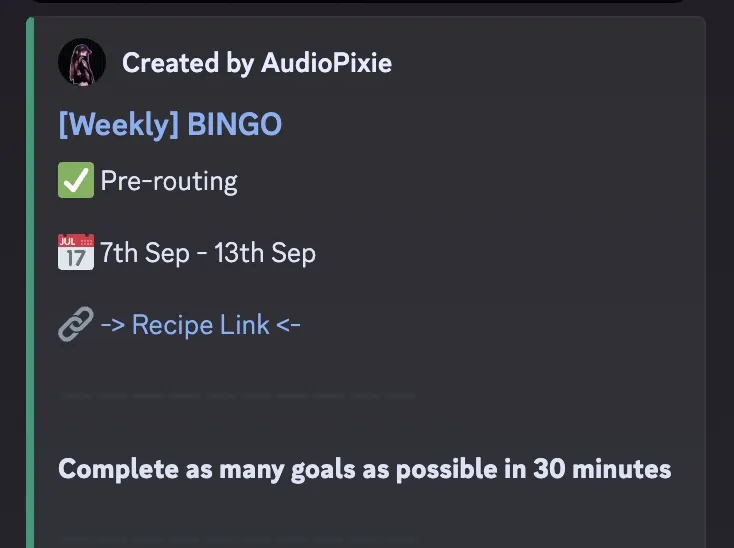
Leaderboard Info
Section titled “Leaderboard Info”The leaderboard post is split into several parts. This gives you the challenge requirements and a link to re-create the board settings for running it.
The title of the leaderboard, which contains the duration, the game mode and optionally a summary of the challenge.
e.g. [Weekly] BINGO - The Maze
✅ Pre-routing / ❌ No Pre-routing
Section titled “✅ Pre-routing / ❌ No Pre-routing”This indicates whether you can route the board before running it or if you have to go in blind.
Pre-routing
- You can plan your route and use whatever tools to figure out your run
- You can attempt and submit as many runs as you like
No Pre-routing
- You must attempt it with no pre-routing or knowledge of the board
- It must be your first run
📆 Leaderboard Dates
Section titled “📆 Leaderboard Dates”The dates the leaderboard is active for.
You can run, submit and post times after this but bot will not always be guaranteed to work with older leaderboards.
If the bot does support the older leaderboard, the times submissions will be marked as late.
🔗 Recipe Link
Section titled “🔗 Recipe Link”The recipe link for the challenge board.
This link opens the site with all the correct settings, seed, modifiers etc needed to run the leaderboard challenge.
🎯 Challenge Requirements
Section titled “🎯 Challenge Requirements”The challenge outlines the requirements needed to complete the board.
Sometimes it can be a simple Complete 2 bingo lines.
Other times it can be more complex!
Submissions
Section titled “Submissions”Below the challenge, shows the ordered list of submissions.
These include
- Player discord username (not display name)
- Time/Score
- System used for the run
How to submit
Section titled “How to submit”Use the /submit bot command in the leaderboard thread
- This will submit your run and add your time/score to the leaderboard
- Only works in leaderboard threads created by the bot
- You can submit multiple times - the bot will use your latest submission
As part of your submission, you will be asked
- For the system you used to complete the board
- To provide either a screenshot or a link to a VOD containing the run (or optionally submit both!)
- For
No Pre-routingsubmissions, you will be asked if it’s your first blind run or a routed one after submitting the command!
Screenshots
Section titled “Screenshots”Screenshots must be a cropped image of the completed board, scorebar & time. The bot may reject submissions that appear to use an invalid screenshot.
VODs must be a link to a video containing the run. Accepted providers are
- YouTube (youtube.com/link-to-vod)
- YouTube (youtu.be/link-to-vod)
- Twitch (twitch.tv/link-to-vod)
The bot may reject submissions that appear to use an invalid link.
Late Submissions
Section titled “Late Submissions”You can submit your time any time after the leaderboard ends but these will be shown as late submissions and displayed at the bottom of the leaderboard.
If you replace a normal submission with a late submission, the late submission will be shown as a replacement and the original submission will be removed.
Removing your time
Section titled “Removing your time”If you need to remove your submission, notify a moderator or game manager.
If you need to just update your time, re-run the submit command!
Requirements
Section titled “Requirements”All submissions should follow the leaderboard rules.
Submissions that do not follow the rules may be removed